
https://www.fmdnqi.com/the-ultimate-dell-laptop-guide-from-inspiron-to-xps/
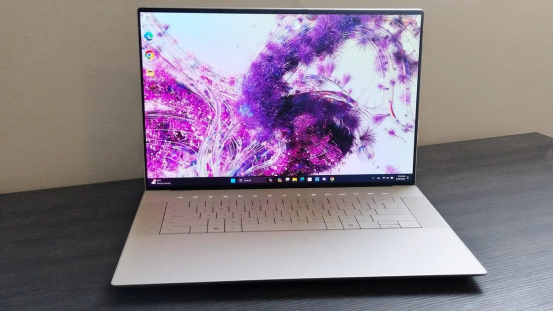
In 2024, Dell has brought out a “luxury feast” – the new XPS 16 (9640). Judging from the configuration alone, this 16.3-inch large-screen flagship is undoubtedly calling out to the creator circle: OLED/LED high-resolution optional screen, Intel Meteor Lake, RTX 40 series independent graphics… At first glance, it does look like the closest thing to the MacBook Pro in the Windows camp. But is it really that good? Let’s pick out five key points and take a look.
1. The screen is superb : OLED visual experience is really impressive
Review websites TweakTown and Tom’s Guide gave a rare unanimous praise: the XPS 16’s 4K 90Hz OLED screen is really beautiful. Not only is it bright (it can reach up to 500 nits), but more importantly, it has deep blacks and true colors. Compared with ordinary LCDs, even Mini-LEDs have to give way.
This screen covers about 115% of the sRGB color gamut. If you are a graphic designer, video editor, or simply picky about colors, this is a canvas made for you. Frankly speaking, this screen is probably its most attractive selling point, bar none.
2. It is enough for daily use and creation, but don’t expect it to be “top-notch”
Equipped with an Intel Core Ultra series processor and an RTX 4060/4070, it is more than capable of running anything. Video transcoding, image batch processing, multitasking with a bunch of tabs open – it can handle all of these fairly smoothly.
But it still has a problem with heat dissipation. The thin and light design means that its independent graphics card can only release about 60W of power. It’s fine for playing some light games and editing videos, but if you need to run Blender or render 8K videos frequently, it may not be able to cope with the heavy load. To put it bluntly, it has performance, but you can’t “exploit” it too much.
3. Attractive appearance, but subtle details
The body shell is made of high-end aluminum alloy, the frame is so narrow that it is almost invisible, and the overall look is indeed very refined. Some people even say it is the “MacBook of the Windows world.”
But it is not without flaws. First of all, the touch keyboard is not a traditional mechanical press, but a bit like “tapping on a glass plate”. Many people need a few days to get used to it when they first use it. Although the touchpad is large and seamless, it is too “invisible” and people often fail to operate it in the blind spot.
Then there are the interfaces. All are USB-C, not even a USB-A. Not to mention the missing micro-SD card slot, which is the most commonly used by photographers, so many users can only plug in adapters every day. Who says that creative notebooks don’t need practicality?
4. The battery life is quite good, but OLED is still a power-hungry device
The battery performance of XPS 16 is actually quite good, and it is one of the best in the Windows camp. The official even claims 14 hours of light use. But this is under the premise that you don’t turn on the high brightness or do heavy work.
Switch to an OLED screen, turn up the brightness, and maybe you play Spotify while editing photos? The battery will drain quickly. Compared with the MacBook Pro? There is still a gap, but in the Windows camp, it is already quite powerful.
5. Too expensive to ignore, and there are actually many competitors
The starting price is okay, around $1,699-1,899, which doesn’t sound outrageous. But once you want OLED, independent graphics, 16GB+ memory… well, it’s easy to spend $3,000. What can you buy at this price? ThinkPad P1, MacBook Pro 16… These machines can also compete head-on in terms of keyboard, ports, battery life and even performance release.
Simply put, if you are an extremely rational consumer and weigh these options, the price/performance ratio of the XPS 16 may not be considered “cost-effective”.
Is it worth buying? My subjective opinion
| Advantages | Limitations |
| OLED screen is amazing, visual enthusiasts will love it | The interface is not good, and the keyboard feels split |
| Online design, thin and light without compromise | Performance release is not suitable for high load |
| Battery life is very good in Windows | The cost-effectiveness of 3,000 dollars is a bit uncertain |
It is recommended for creators who want a thin and light laptop with a large screen and occasionally edit videos and photos, or for people who are obsessed with the appearance of the laptop.
If you are a serious designer or editor who has high requirements for keyboard, interface, and expandability, you may prefer ThinkPad P1 or MacBook Pro .
It is not recommended for people who are on a tight budget and are looking for pure performance or gaming performance. The mid-range version of the XPS 16 is too embarrassing, and the low-range version is not worth the shell.
My suggestion (very subjective)
Want to buy? Then go for OLED + RTX 4060/4070 in one go. Don’t buy the mid-range model just because of the budget, because that would lose the most valuable part.
Are you worried about the interface and keyboard? Prepare an adapter + external keyboard, and your life will be much easier.
If you value performance/expandability more, don’t worry, keep an eye on the discount season of gaming laptops or workstations, which may be more suitable for you.
Conclusion: Is it a creation book? Perhaps, it is more like a “creative companion for those who love appearance”
The positioning of XPS 16 is actually quite subtle. You say it is a creation notebook, and it does have the ability to process images and edit videos. But it is more like a notebook built for the “creator’s temperament” rather than a machine built for the “creative load”.
aesthetic creation notebook that’s somewhere between extreme production and extreme design .
https://www.fmdnqi.com/the-ultimate-dell-laptop-guide-from-inspiron-to-xps/